
SAA-C03 has four domains: secure architectures (30%), resilient architectures (26%), high-performing architectures (24%) and cost-optimized architectures (20%). S3 is the one service that can plausibly appear in all four. It is a security question when it is about bucket policies and encryption, a resilience question when it is about versioning and replication, a performance question when it is about multipart uploads and prefixes — and, more than anything else, a cost question.
Work through any large set of practice questions and roughly one in four will involve S3 somewhere in the scenario, usually alongside EC2, Lambda, CloudFront or a VPC. Of those, the clear majority end with some variation of most cost-effective or least operational overhead.
That is the reason studying S3 as a feature list does not work. The exam rarely asks what S3 is. It asks which class, which rule, which endpoint, which key. Then it makes the difference between two answers that both look correct come down to a number: 30 days, 128 KB, 5 GB, 15 minutes.
This guide walks those decisions in roughly the order the exam presents them. Then it covers something no practice test can teach you: the S3 defaults that changed in 2025 and 2026, long after SAA-C03 was written.
All of S3, one sentence at a time
Before the decisions, the map. S3 is no longer a single thing with a few pricing tiers — there are four kinds of bucket and eight storage classes, and knowing which is which stops half the confusion.
The four bucket types:
- General purpose bucket — the classic S3 bucket, unlimited objects, every storage class available; this is what an exam question means when it says "an S3 bucket".
- Directory bucket — the bucket type behind S3 Express One Zone, holding data in a single Availability Zone with a hierarchical namespace for the lowest possible latency.
- Table bucket — stores Apache Iceberg tables as a managed resource, with compaction and snapshot maintenance handled by S3 itself.
- Vector bucket — stores and queries embedding vectors natively, built for semantic search and for giving AI agents long-term memory.
The eight storage classes:
- S3 Standard — frequently accessed data across at least three AZs, with no minimum duration and no retrieval fee.
- S3 Intelligent-Tiering — Standard's durability plus automatic movement between tiers, for data whose access pattern you cannot predict.
- S3 Standard-IA — millisecond access for data read roughly once a month, trading a 30-day minimum and a retrieval fee for cheaper storage.
- S3 One Zone-IA — the same economics in a single AZ, about 20% cheaper, and safe only for data you can recreate.
- S3 Glacier Instant Retrieval — archive pricing with millisecond reads, for data touched a few times a year, with a 90-day minimum.
- S3 Glacier Flexible Retrieval — cheaper archive storage where a restore takes anywhere from 1–5 minutes to 12 hours.
- S3 Glacier Deep Archive — the lowest storage price S3 offers, with a 180-day minimum and restores measured in 12 to 48 hours.
- S3 Express One Zone — single-digit-millisecond storage in one AZ, for workloads that read the same data over and over.
The exam lives almost entirely in the general purpose bucket and the first seven classes. The rest is what you will meet at work.
What the exam actually asks about S3
Almost every S3 question is one of three shapes. Recognising which one you are looking at before you read the answer options cuts the list in half.
- "Data is written once, read rarely, must be kept for N years — cheapest option?" A storage class plus a lifecycle rule. The trap is always a minimum storage duration or a retrieval fee that the cheap-looking option quietly carries.
- "The bucket must not be reachable from the internet." Block Public Access, a bucket policy, and usually a gateway VPC endpoint. The trap is an answer that solves it with an ACL or with a NAT gateway.
- "An on-premises system produces X TB and it has to land in S3." DataSync, Storage Gateway, Snowball, or Transfer Family. The trap is bandwidth arithmetic the question expects you to do.
Underneath all three sits the same instruction, phrased two ways: most cost-effective and least operational overhead. When both appear in the same question, managed beats self-built, and per-GB-month beats per-request — unless the access pattern makes retrieval fees dominate.
Which S3 storage class does the question want?
Start from access frequency, not from price. The class you pick determines the minimum storage duration you get billed for, and that minimum is what most cost questions actually turn on.
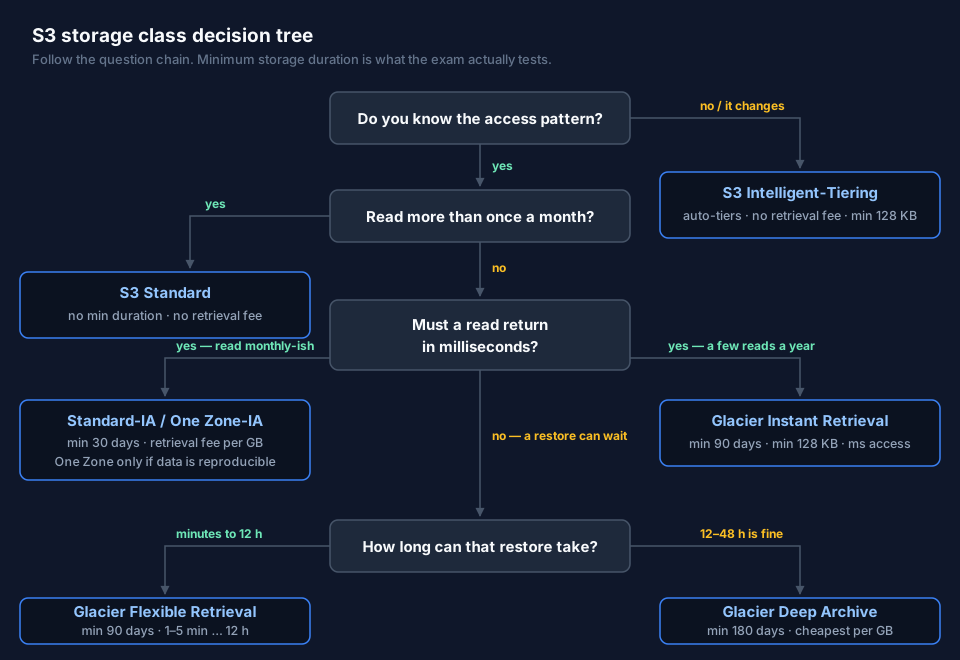
The numbers behind the tree, which are worth memorising verbatim:
| Storage class | AZs | Min. duration | Min. billable size | First byte |
|---|---|---|---|---|
| S3 Standard | ≥3 | none | none | milliseconds |
| S3 Intelligent-Tiering | ≥3 | none | 128 KB | ms (archive tiers: min/hrs) |
| S3 Standard-IA | ≥3 | 30 days | none | milliseconds |
| S3 One Zone-IA | 1 | 30 days | none | milliseconds |
| S3 Glacier Instant Retrieval | ≥3 | 90 days | 128 KB | milliseconds |
| S3 Glacier Flexible Retrieval | ≥3 | 90 days | none | 1–5 min to 12 h |
| S3 Glacier Deep Archive | ≥3 | 180 days | none | 12–48 h |
| S3 Express One Zone | 1 | 1 hour | none | single-digit ms |
Two traps the exam likes:
One Zone-IA is not "cheaper IA". It stores data in a single Availability Zone. If that AZ is lost, the data is gone. It is the right answer only when the data can be regenerated — thumbnails, transcoded renditions, secondary copies. If the question says "critical" or "cannot be recreated", One Zone is a distractor no matter how attractive the price.
Intelligent-Tiering is the answer to "unknown or changing access pattern", not to "cheapest". It charges a small monitoring fee per object and moves objects between tiers automatically, with no retrieval fee for the frequent and infrequent tiers. For a known, stable pattern, a lifecycle rule to a fixed class is cheaper.
For restores, know the tiers: Expedited gets objects under 250 MB back in 1–5 minutes from Glacier Flexible Retrieval, Standard takes 3–5 hours, and Bulk 5–12 hours. Deep Archive has no Expedited option at all: Standard is within 12 hours, Bulk within 48 hours. When a question offers "restore in minutes" for Deep Archive, that option is wrong by definition.
Lifecycle: the rule most cost questions turn on
A lifecycle rule moves objects down the cost ladder on a schedule and deletes them at the end. It never moves them back up — a "restore" from Glacier produces a temporary copy, and putting an object back in Standard permanently means rewriting it as a new object.
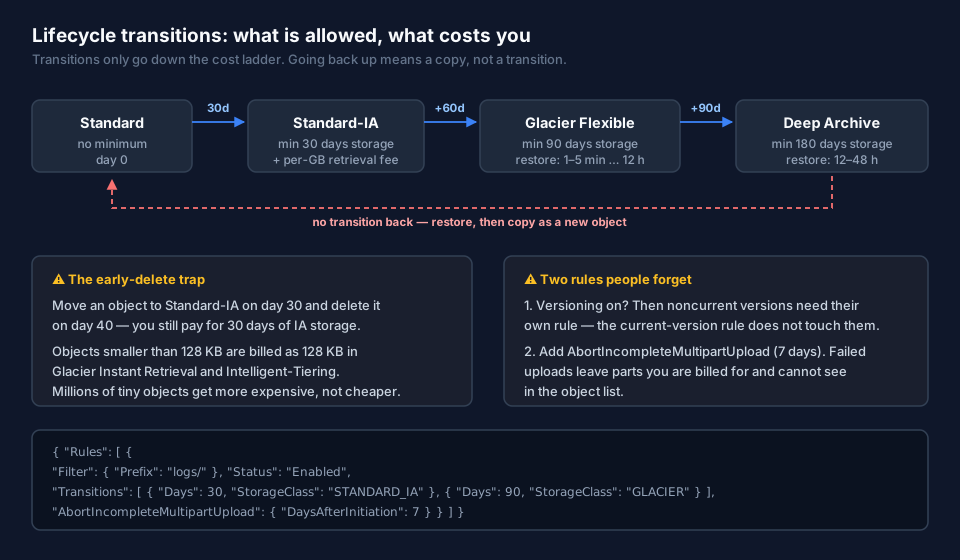
{
  "Rules": [{
    "ID": "logs-archive-and-expire",
    "Filter": { "Prefix": "logs/" },
    "Status": "Enabled",
    "Transitions": [
      { "Days": 30,  "StorageClass": "STANDARD_IA" },
      { "Days": 90,  "StorageClass": "GLACIER" },
      { "Days": 365, "StorageClass": "DEEP_ARCHIVE" }
    ],
    "Expiration": { "Days": 2555 },
    "AbortIncompleteMultipartUpload": { "DaysAfterInitiation": 7 }
  }]
}
Four things that go wrong in real accounts and in exam answers:
Early deletion still costs. Move an object to Standard-IA on day 30 and delete it on day 40, and you pay for 30 days of IA storage anyway. A rule that transitions data with a shorter real lifetime than the class minimum makes the bill go up, not down.
Small objects get more expensive. Glacier Instant Retrieval and Intelligent-Tiering bill objects under 128 KB as if they were 128 KB. Archiving millions of tiny files is a classic own goal — aggregate them first.
Versioning needs its own rule. With versioning on, the rule you wrote applies to current versions. Noncurrent versions keep accumulating until you add NoncurrentVersionTransition and NoncurrentVersionExpiration. This is one of the most common sources of "why is my bucket 4× the size of my data".
Incomplete multipart uploads are invisible and billable. Failed uploads leave parts behind that do not show up in a normal object listing but do show up on the bill. AbortIncompleteMultipartUpload with 7 days belongs in every bucket policy you ever write. S3 Storage Lens will point at buckets that lack it.
Who is allowed to read the bucket?
Access to an S3 object is evaluated across several layers, and the order matters: an explicit Deny anywhere wins, and Block Public Access overrides everything that would grant public access.
- Block Public Access — on by default for new buckets, at the account and bucket level. When a question describes an accidentally public bucket, BPA is almost always part of the answer.
- Bucket policy — resource-based, attached to the bucket. This is where cross-account access,
aws:SecureTransport, VPC endpoint conditions and IP restrictions live. - IAM identity policies — what a principal in your account is allowed to do.
- VPC endpoint policies, SCPs, RCPs — organisational guardrails on top.
- ACLs — disabled by default since April 2023 under the bucket owner enforced setting. Modern buckets manage access with policies only. If an answer option hands out permissions with an object ACL, treat it with suspicion.
Two mechanisms come up constantly and are worth being precise about:
Presigned URLs grant temporary access to a single object using the credentials of whoever generated the URL. This is the answer for "let a user download a private file without giving them an AWS identity". The expiry is bounded by the credentials that signed it — up to 7 days with IAM user credentials, but only as long as the session for temporary credentials.
CloudFront with Origin Access Control (OAC) is the answer for "serve private S3 content globally through a CDN". OAC replaced Origin Access Identity (OAI); OAI still appears in older questions and still works, but nothing new should use it. The bucket stays private, and the bucket policy trusts the CloudFront distribution.
Gateway endpoint or interface endpoint?
The phrase "traffic must not traverse the internet" turns up constantly, and for S3 the cheapest correct answer is a gateway endpoint: it adds a route table entry, costs nothing, and keeps S3 traffic on the AWS network.
An interface endpoint (PrivateLink) also works, and it is the right answer when the traffic comes from on-premises over Direct Connect or VPN, or when you need a private IP inside the VPC — but it is billed per hour and per GB. When both appear as options and the question emphasises cost with no on-premises component, gateway is the answer.
Encryption: four server-side options, one of them already on
Every S3 bucket has encryption at rest by default. Since January 2023, SSE-S3 (AES-256) is applied automatically to every new object with no configuration and no extra cost. Any answer option that presents "enable encryption at rest" as the work to be done is describing something S3 already did.
| Option | Key management | When it's the right answer |
|---|---|---|
| SSE-S3 | AWS, invisible | Default. No compliance requirement about key custody |
| SSE-KMS | Your KMS key | Audit trail of key usage, key rotation, per-key access control |
| DSSE-KMS | Your KMS key, two layers | Explicit dual-layer requirement (some regulated workloads) |
| SSE-C | You send the key per request | Rare. You must hold the key; AWS services cannot read the object |
| Client-side | You, before upload | Data must be encrypted before it ever reaches AWS |
The exam's tell for SSE-KMS is any mention of auditing key usage, rotating keys, or restricting who can decrypt independently of who can read the object. Its trap is throttling: every object read triggers a KMS call. Enable S3 Bucket Keys and those calls drop by up to 99%, which is also the answer to "KMS request costs are too high".
Keeping data safe: versioning, Object Lock, replication
Versioning keeps every variant of an object. It is a prerequisite for replication and for Object Lock, and it is the answer to "recover from accidental deletion" — a delete on a versioned bucket writes a delete marker rather than removing data.
MFA Delete requires a second factor to permanently delete a version or to suspend versioning. It can only be enabled by the bucket owner using root credentials, which is exactly the detail questions test.
Object Lock implements write-once-read-many. Two modes, and the difference is the whole question:
- Governance mode — users with the
s3:BypassGovernanceRetentionpermission can remove the lock. Protection against accident. - Compliance mode — nobody can shorten the retention or delete the object, including the root user, until the period expires. Protection against a regulator. When a question says "not even an administrator", the answer is compliance mode.
Replication copies objects to another bucket, asynchronously, in the same Region (SRR) or across Regions (CRR). Both buckets need versioning. Replication is not retroactive: existing objects need S3 Batch Replication. If the requirement includes a time guarantee, that is Replication Time Control — 99.99% of objects within 15 minutes, backed by an SLA.
Performance answers you can memorise
- Multipart upload — recommended above 100 MB, required above 5 GB. Maximum 10,000 parts, each 5 MiB to 5 GiB. It also enables parallel and resumable uploads. Any question about improving upload throughput for large files starts here.
- S3 Transfer Acceleration — routes uploads through the nearest CloudFront edge location. The answer for "users worldwide upload to one bucket and it's slow". Not for downloads, and not for traffic already inside AWS.
- Byte-range fetches — parallel ranged GETs to speed up downloads, and to read just the header of a large object.
- Request rates — 3,500 PUT/COPY/POST/DELETE and 5,500 GET/HEAD per second per partitioned prefix, with no limit on prefix count. Spreading keys across prefixes scales the rate linearly. (The old "randomise your key prefix" advice is obsolete — S3 has handled sequential keys fine since 2018.)
- S3 Express One Zone — single-digit millisecond latency in one AZ via directory buckets, for workloads that hammer the same data repeatedly. Rare in current questions; increasingly common in real architectures.
Getting data in: the on-premises questions
Moving data from a datacentre into S3 is a whole question family. Three services, three distinct signals:
| Signal in the question | Answer |
|---|---|
| Recurring or one-off transfer over the network, keep metadata, verify integrity | AWS DataSync |
| Applications must keep using NFS/SMB while data lands in S3 | Storage Gateway (File Gateway) |
| Petabytes, limited bandwidth, "would take months over the network" | AWS Snowball |
| SFTP/FTPS clients that cannot be changed | AWS Transfer Family |
Do the arithmetic when bandwidth is given: 100 TB over a 1 Gbps link that is fully saturated takes roughly 9 days. Question writers pick numbers where the network option is obviously absurd or obviously fine.
What changed after the exam was written
SAA-C03 launched in 2022, and the study material built around it is older still. Several S3 facts that are treated as correct answers are no longer true of the service you would build on today.
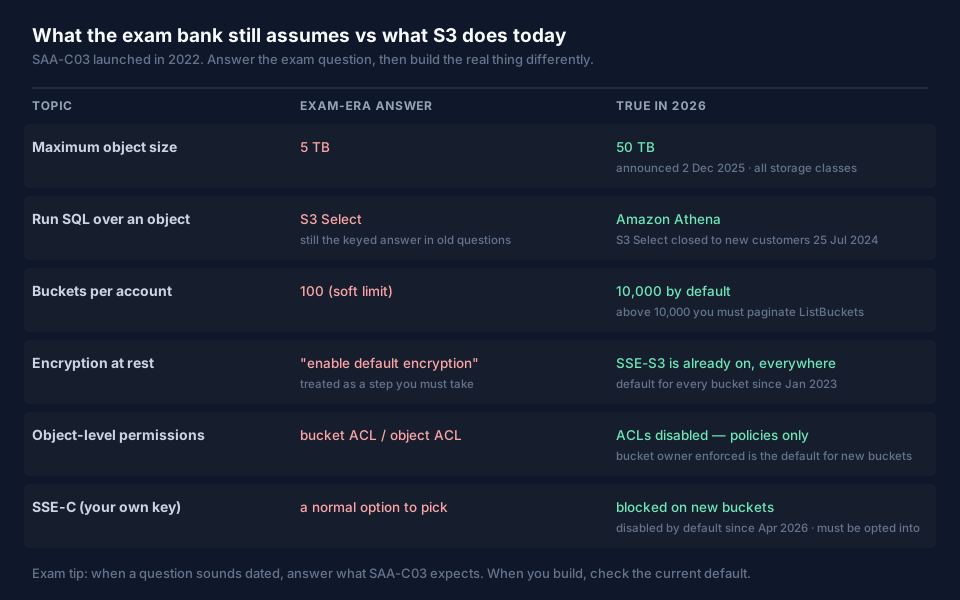
The ones worth knowing, with dates:
- Maximum object size is 50 TB, up from 5 TB, announced 2 December 2025 and supported in every storage class.
- S3 Select is closed to new customers as of 25 July 2024. AWS points you at Athena. S3 Object Lambda followed, limited to existing customers from 7 November 2025. Older material still presents S3 Select as the answer for "run SQL against a single object".
- The default bucket quota is 10,000 per account, not 100. Above that,
ListBucketsmust be paginated. - ACLs are disabled and encryption is on for new buckets, as covered above.
- S3 has grown a data platform: S3 Tables (managed Apache Iceberg), S3 Metadata (queryable object metadata), S3 Vectors (vector storage at up to 90% lower cost, GA at re:Invent 2025), and S3 Files (buckets mounted as file systems, announced April 2026). None of this is on the exam. All of it will come up in an interview.
The S3 cheatsheet: phrase in, answer out
Exam questions reuse a small vocabulary. Once you can hear the phrase, the answer usually follows without much reasoning. These are the ones worth recognising on sight — the wording on the left is close to how the exam actually writes it.
Choosing where the data lives
| The question says | Answer | Why |
|---|---|---|
| object storage · static website hosting · data lake · durable and virtually unlimited | Amazon S3 | Eleven nines of durability, no capacity planning |
| access pattern is unknown or changes over time | S3 Intelligent-Tiering | Automatic tiering, no retrieval fee in the main tiers |
| rarely accessed · retrieval in minutes to hours · lowest cost · retain for 7 years | Glacier Flexible Retrieval or Deep Archive | Deep Archive is cheapest; 12–48 h restore |
| accessed a few times a year but must return instantly | Glacier Instant Retrieval | Archive pricing, millisecond reads, 90-day minimum |
| reproducible data · cost matters more than an AZ failure | One Zone-IA | Single AZ, ~20% cheaper, only for recreatable data |
| move to a cheaper tier after 30/90 days, then delete | S3 Lifecycle policy | Age-based transitions beat manual housekeeping |
| high performance computing · ML training data · linked to an S3 bucket | FSx for Lustre | POSIX throughput with an S3 link |
Protecting and restricting it
| The question says | Answer | Why |
|---|---|---|
| cannot be deleted or overwritten · WORM · compliance or governance mode | Object Lock + versioning | Compliance mode blocks even the root user |
| recover from accidental deletion or overwrite | Versioning | Deletes write a marker, not a hole |
| without traversing the public internet | Gateway VPC endpoint | Free, route-table based, S3 and DynamoDB only |
| serve private content globally with low latency | CloudFront + OAC | Bucket stays private, distribution is trusted |
| let one user download one private file, no AWS account | Presigned URL | Time-bounded, signed with the creator's credentials |
| audit who used the key · rotate keys · restrict decrypt separately | SSE-KMS (+ S3 Bucket Keys) | CloudTrail visibility; Bucket Keys cut KMS calls up to 99% |
| encrypted before it ever reaches AWS · end-to-end | Client-side encryption | AWS never sees plaintext or the key |
| discover PII or credit card data sitting in S3 | Amazon Macie | Managed sensitive-data discovery |
| replicate to another Region for compliance or DR | CRR (versioning on both sides) | Same Region is SRR; add RTC for the 15-minute SLA |
Getting data in and querying it
| The question says | Answer | Why |
|---|---|---|
| terabytes · fast internet available · uploads from around the world | Transfer Acceleration + multipart | Edge locations absorb the distance |
| petabytes · limited bandwidth · would take months over the network | AWS Snowball | Physical shipping beats the link |
| on-premises NFS/SMB share · applications keep using it | Storage Gateway (File Gateway) | Local cache, S3 backend, no app changes |
| scheduled or incremental copy from on-premises, keep metadata | AWS DataSync | Purpose-built transfer with verification |
| managed SFTP/FTPS · partners upload files directly into S3 | AWS Transfer Family | Protocol front end, S3 storage |
| replace physical tape backup · virtual tape library | Storage Gateway (Tape Gateway) | VTL interface, Glacier behind it |
| near real-time delivery of streaming data into S3 | Kinesis Data Firehose | Buffered managed delivery, no shard management |
| run SQL directly on data in S3 · serverless · pay per data scanned | Amazon Athena | The current answer; S3 Select is closed to new customers |
| retain logs long term at low cost and query them later | Export to S3, query with Athena | Cheap storage plus on-demand SQL |
Four traps that look right and are not
- Snowball when the link is fast. Snowball is the answer for limited bandwidth. With a healthy internet connection, Transfer Acceleration or DataSync is faster and simpler.
- EC2 and a load balancer for static content. Static files are an object storage problem: S3 plus CloudFront, no servers.
- One Zone-IA for anything critical. The price looks best right up until the AZ is gone.
- "Enable encryption at rest" as the work item. It has been on by default since January 2023 — if that is the whole answer, the answer is doing nothing.
FAQ
How much of the SAA-C03 exam is about S3?
AWS does not publish a per-service breakdown, but S3 touches all four exam domains — security, resilience, performance and cost — and storage appears in the task statements of each. In practice, around a quarter of practice questions involve S3 somewhere in the scenario, which makes it one of the two or three services you cannot afford to be shaky on, alongside VPC networking and EC2.
Which S3 storage class is cheapest?
S3 Glacier Deep Archive has the lowest per-GB storage price, but it has a 180-day minimum storage duration and restores take 12 to 48 hours. Cheapest for a workload depends on how long objects live and how often they are read — an object read weekly costs far more in Deep Archive, once retrieval fees are counted, than it does in Standard.
What is the difference between S3 Standard-IA and One Zone-IA?
Both are for infrequently accessed data with millisecond retrieval and a 30-day minimum duration. Standard-IA stores data across at least three Availability Zones; One Zone-IA uses a single AZ and costs about 20% less. Use One Zone-IA only for data you can recreate.
Do I need to enable encryption on an S3 bucket?
No. Since January 2023 all new objects are encrypted with SSE-S3 by default in every bucket. You configure encryption only to choose a different mode — SSE-KMS for key auditing and access control, DSSE-KMS for dual-layer requirements, or client-side encryption.
When should you use Intelligent-Tiering instead of a lifecycle rule?
Use Intelligent-Tiering when the access pattern is unknown or changes over time; it moves objects between tiers automatically and charges no retrieval fee for the frequent and infrequent tiers. Use an explicit lifecycle rule when the pattern is predictable — it avoids the per-object monitoring charge.
Is S3 Select still the right answer for querying S3 data?
Not for anything new. S3 Select has been closed to new customers since 25 July 2024, and AWS recommends Amazon Athena. Older exam material still keys S3 Select, so answer it that way on the exam and use Athena in production.
How to study S3 for SAA-C03
Memorise the numbers that decide questions — 30 / 90 / 180 day minimums, the 128 KB billing floor, the 5 GB multipart threshold, 3,500 and 5,500 requests per prefix, the 15-minute RTC SLA. These are what separate two answer options that otherwise read identically.
Then build one bucket and watch it work: enable versioning, write a lifecycle rule with a noncurrent expiration, upload a 200 MB file and observe the multipart parts, turn on a gateway endpoint and confirm the traffic leaves the internet route. An hour of that fixes more wrong answers than a day of flashcards.
And be careful with practice questions from unofficial sources. Where a keyed answer and the community consensus disagree, the question is usually ambiguous or out of date rather than hard — verify anything that matters against the AWS documentation instead of memorising a disputed key.
Keep the two mental models separate: what SAA-C03 expects, and what S3 does in 2026. The exam rewards the first. Your next architecture review rewards the second.